3DVista vs Spatial Studio
Compare 3DVista and Spatial Studio by authoring depth, cloud splat generation, browser tours, branded handoff, and client workflow.

In this guide
3DVista is a broad virtual-tour authoring product; Real Horizons fits teams generating splats from flexible captures and delivering them as guided browser tours.
Short answer
3DVista is the better fit when you want deep, desktop-style virtual tour authoring across panoramas and mixed media. Spatial Studio is the better fit when Gaussian splat capture and reconstruction should flow directly into a polished browser tour.
Neither description makes the other product obsolete. The decision is about where your production time goes. 3DVista gives an experienced author a large toolbox. Spatial Studio reduces the number of handoffs between field capture, splat processing, guided authoring, publishing, and analytics.
Quick fit comparison
| Choose | When this sounds like your work |
|---|---|
| 3DVista | “I build highly customized panorama tours and want deep control over scenes, skins, media, offline output, or VR behavior.” |
| Spatial Studio | “I capture real spaces as splats and need a repeatable path to a branded link with maps, floor plans, CTAs, and reporting.” |
| Both | “I need 3DVista's specialist authoring on some jobs and Spatial Studio's splat-native workflow on others.” |
Where 3DVista is stronger
3DVista has the advantage when authoring depth is the product. A museum, training experience, or elaborate panorama tour may need custom navigation, layered media, quizzes, offline delivery, or a presentation assembled scene by scene. A mature desktop authoring model is useful when the operator wants that control and can afford the production time.
It is also a familiar choice for panorama specialists. If the capture library is already built around 360 images and the business has reusable 3DVista templates, switching platforms for novelty would be a poor reason.
Where Spatial Studio is stronger
Spatial Studio starts earlier in the job. Spatial Lens guides iPhone capture, the Mac app can generate locally on Apple silicon, and the web app supports cloud processing from phone media, photo sets, 360 cameras, drones, PortalCam, or an existing splat. The project then continues into waypoints, portals, floor plans, Google 3D Maps, supporting media, branding, embeds, CTAs, and analytics.
That continuity is valuable for a small team. The photographer does not need to become a custom-tour developer to ship a convincing result. The agent or venue manager receives a link that is easy to open and measure, while advanced features remain available when the site needs more context.
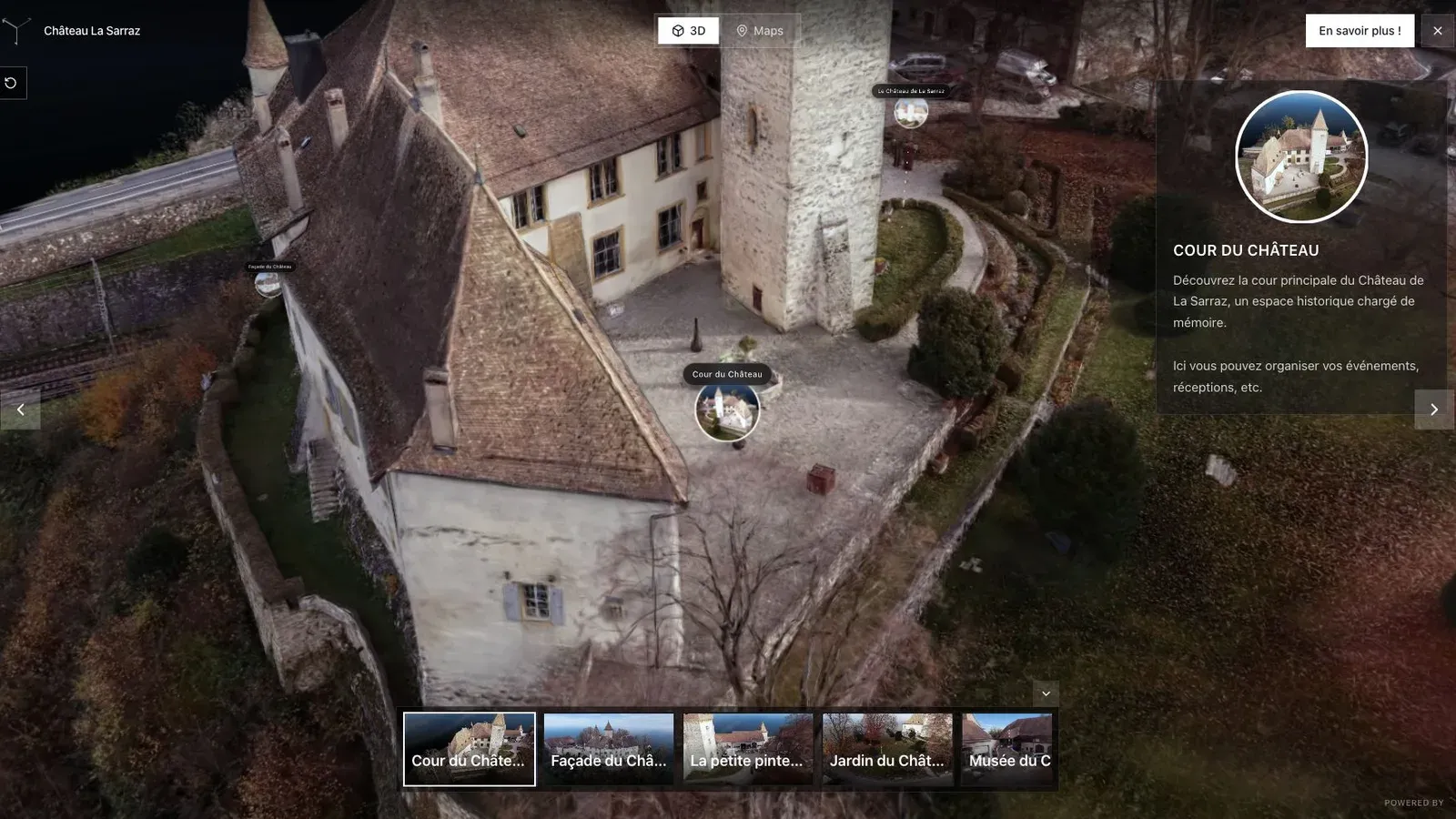
A heritage project may justify deeper storytelling, but every interaction still needs a reason to exist.
Compare production time, not feature counts
Run the comparison using a finished brief. For example: one heritage building, eight visitor stops, two archival images, a booking link, an embedded web page, and a mobile review. Record how long it takes to prepare the source, author the route, publish revisions, and hand the tour to the client.
This makes the trade-off visible. A powerful option can lose if half its controls never help the visitor. A streamlined product can lose if the project requires interactions it cannot express. Count the hours attached to the requested experience, not the number of buttons in the editor.
What Spatial Studio adds to a splat-led business
For teams selling photorealistic 3D capture, the integrated reconstruction choices matter as much as the editor. A creator can keep a private test local on a Mac, send a larger capture to the cloud, use an iPhone for a small interior, or bring in 360 and drone media for a broader site. Those routes arrive in the same tour library.
The publishing layer also connects the scene to a business outcome. A property tour can carry an inquiry action. A venue can link to booking. A museum can guide visitors through points of interest. Analytics show whether people opened the tour and interacted with those elements.
Questions to answer before buying
- Do most jobs begin as panoramas, splats, or a mixture?
- Does the team need custom interaction logic or a fast repeatable template?
- Will offline output or VR be a contractual requirement?
- Who handles revisions after the first publish?
- Does the client expect engagement reporting?
If the answers lean toward specialist panorama authoring, choose 3DVista. If they lean toward flexible splat generation and commercial browser delivery, choose Spatial Studio.
Frequently asked questions
Is Spatial Studio a complete 3DVista replacement?
No. 3DVista can be stronger for deeply customized panorama, offline, and VR projects. Spatial Studio is stronger for an integrated Gaussian splat workflow and faster client-facing delivery.
Can Spatial Studio publish 360 content too?
Yes. Spatial Studio can combine splats with 360 panoramas, maps, floor plans, and supporting media inside one tour.
Which is easier for a real estate photographer?
Spatial Studio is usually the more direct fit when the photographer wants to capture, generate, guide, publish, and measure without building a bespoke tour interface for each listing.
Related reading
Next step
Build a Spatial Studio tour
Use the guide with your own project, or inspect a published example before starting.
Continue reading
Related articles
Tool Comparisons
Giraffe360 vs Matterport vs Polycam, Three Workflows, Three Very Different Bets
A comparison of Giraffe360, Matterport, and Polycam through the lens of workflow design, business model, and who each platform is really built for.
Read articleTool Comparisons
CloudPano vs Spatial Studio
Compare CloudPano and Spatial Studio for virtual tours, splats, guided stops, branding, lead capture, embeds, and analytics.
Read article